Add your debts
A balance, an interest rate and a minimum payment for each card or loan. That’s all Clearward needs.
3,000$5018%A clear plan. Room to breathe. A next step you can actually take. Clearward turns the debts you already know into a month-by-month payoff plan, privately, on your iPhone.

Start with what you know. No statements to upload, no accounts to link. Just the numbers you already have, typed the way you would naturally write them.
A balance, an interest rate and a minimum payment for each card or loan. That’s all Clearward needs.
3,000$5018%Choose what you can put toward debt each month. Clearward keeps every minimum covered and keeps your buffer intact.
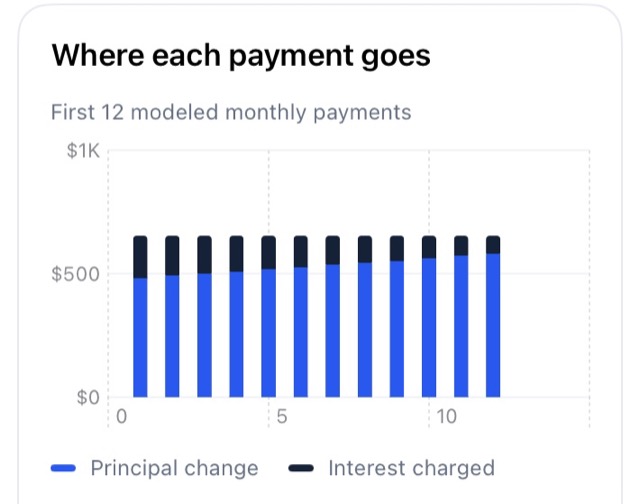
See your debt-free month and exactly what to pay each debt right now. When one is paid off, its payment rolls into the next.
This uses the same approach as the app. Edit the sample debts or use your own numbers. Everything runs in this browser tab, and nothing you type is sent anywhere.
| Name | Balance | APR | Minimum | Remove |
|---|
Estimates use monthly interest (APR ÷ 12), your minimums, and no new charges or fees. When a debt is paid off, its minimum rolls into the next one. Your lender’s numbers may differ slightly. Not financial advice.
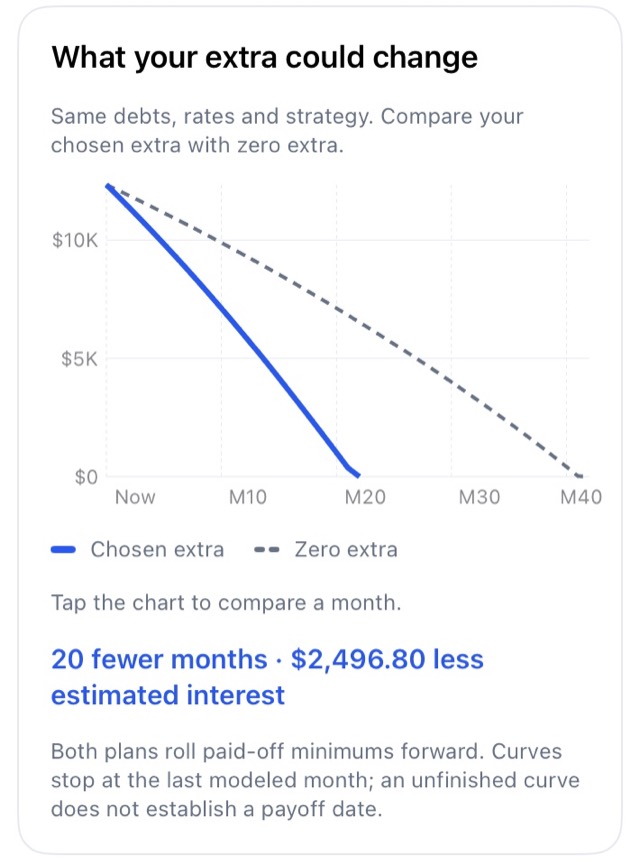
Slide the extra payment and watch your payoff date move. Pick highest-interest-first or smallest-balance-first, and your choice saves instantly.
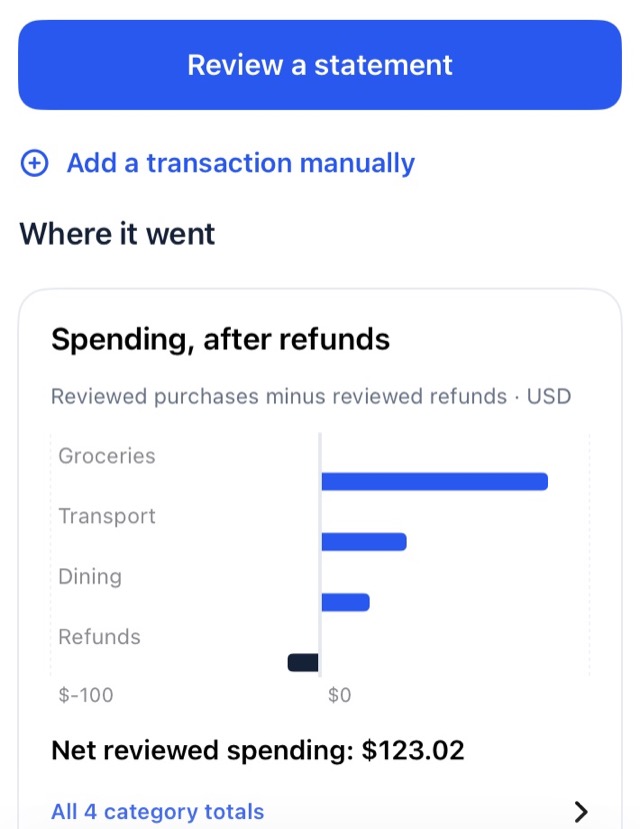
Review a statement and see where your money went. Try a change and watch your debt-free date respond, then apply it to your budget only if you choose to.
On supported iPhones, Clearward can suggest spending categories using Apple’s on-device model. No cloud, no remote AI. Just a helpful first draft for you to check.
Processed on this iPhone · suggestions only, you confirm
Forecasts are labeled as forecasts. Missing months aren’t drawn as zero. History is only what you’ve actually entered, never invented to make a prettier line.
Clearward has no servers to send your data to. Your debts, budget and transactions live in a protected file on your iPhone, and only you decide where they go.
All calculation happens on the device. Your data is stored with iOS file protection and excluded from device backups.
Imported files are read in memory to find transactions. Only the rows you confirm are saved, and the original document is not retained.
Export everything as JSON to a place you choose, or delete all of it from Settings. It’s your data, start to finish.
Debt is stressful enough without fine print. Here’s exactly what Clearward is, and what it isn’t.
Clearward doesn’t connect to your bank or make payments. Logging a payment is a note for your plan; you pay your lenders as you normally would.
Projections use monthly interest and fixed minimums. Daily interest, fees and new charges can make your lender’s numbers differ slightly.
Clearward isn’t financial advice. It shows the effect of choices you make, and nothing changes without your say-so.
If a budget can’t cover the interest, Clearward says so plainly instead of promising a payoff date that won’t arrive.
Clearward is coming soon to the App Store for iPhone. It will run on iOS 17 and later.
No. Clearward never asks for bank logins. You type in your balances, rates and minimums. If you want spending insights, you can import a CSV or text-based PDF statement that you’ve downloaded yourself.
Paying the highest interest rate first usually costs the least overall. Paying the smallest balance first gives you quicker wins, which helps some people stay motivated. Clearward starts with highest interest first, and you can switch anytime in Plan and see the difference instantly.
It’s an estimate based on the balances you enter, monthly interest (APR ÷ 12), your minimums and no new charges. Lenders calculate daily interest and may add fees, so their numbers can differ slightly. Update a balance from your latest statement anytime to keep things on track.
In a single protected file on your iPhone. Clearward has no account system and no servers. It’s excluded from device backups, so if you’d like a copy, use Export in Settings and choose where to save it.
No. Category suggestions use Apple’s on-device model only, on iPhones with Apple Intelligence on iOS 26 or later. Only short merchant descriptions are classified, and suggestions never confirm a row for you. On other iPhones, built-in rules and manual choices work just the same.
Yes. “Explore the sample app” opens a clearly labeled demo with fictional data. Your own workspace is untouched, and you return to it when you exit.
More detail on imports, exports and settings lives on the Support page.
Clearward is coming soon to iPhone. Until then, build a sample plan and see what your next chapter could look like.
Requires iOS 17 or later.